For Mac or Windows + iPhone
iPhone fast.
Laptop hotspot slow?
Put your Mac or Windows PC online through your iPhone's regular phone data instead of the capped hotspot allowance. Any carrier. No jailbreak.
Free for your first 2 hours, no card or email. On Windows? Download for Windows.
Two apps work together: FastNet Connect on your Mac or Windows PC (free for your first 2 hours connected, then $29 one-time with a 30-day refund; one license covers both) and ProxyDeck on your iPhone (free on the App Store). No card or email for the trial. Mac: Apple Silicon, macOS 13+. PC: Windows 10 or 11. iPhone: iOS 16+.
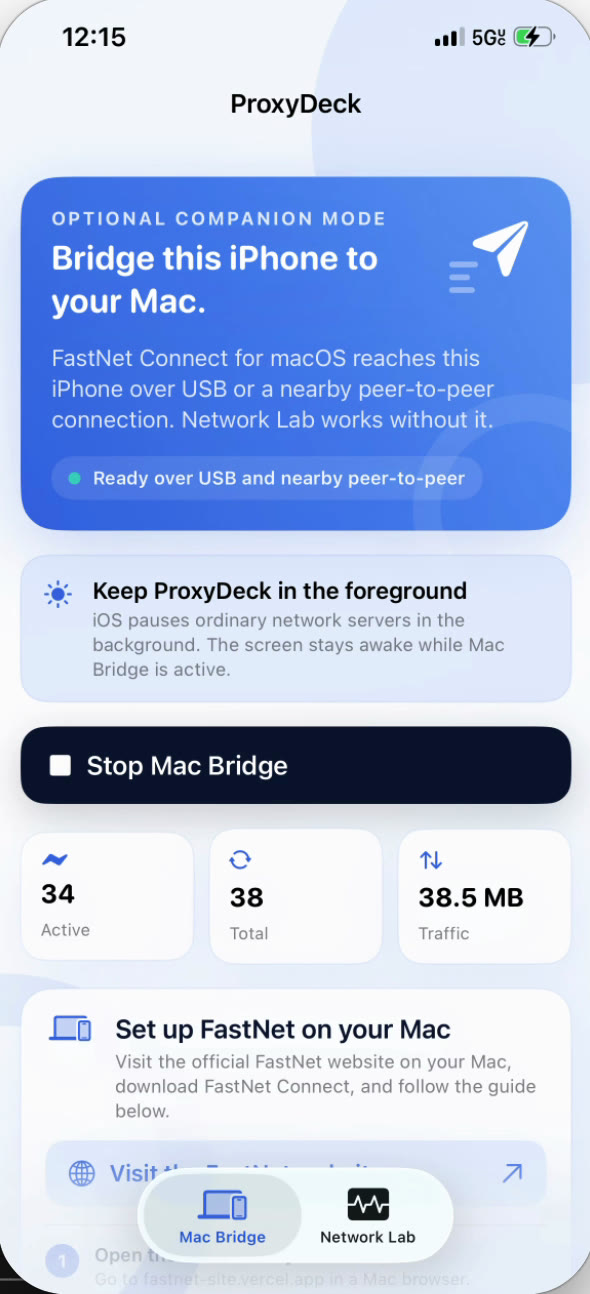
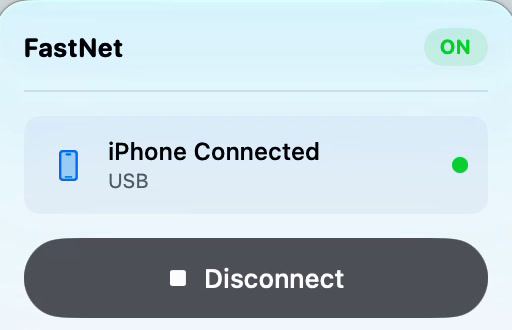
Keep ProxyDeck open on your iPhone while connected. The connection stops when the app leaves the foreground. Installing the free iPhone app alone does not connect your computer: it works together with FastNet Connect on a Mac or a Windows PC.
Measured, not promised
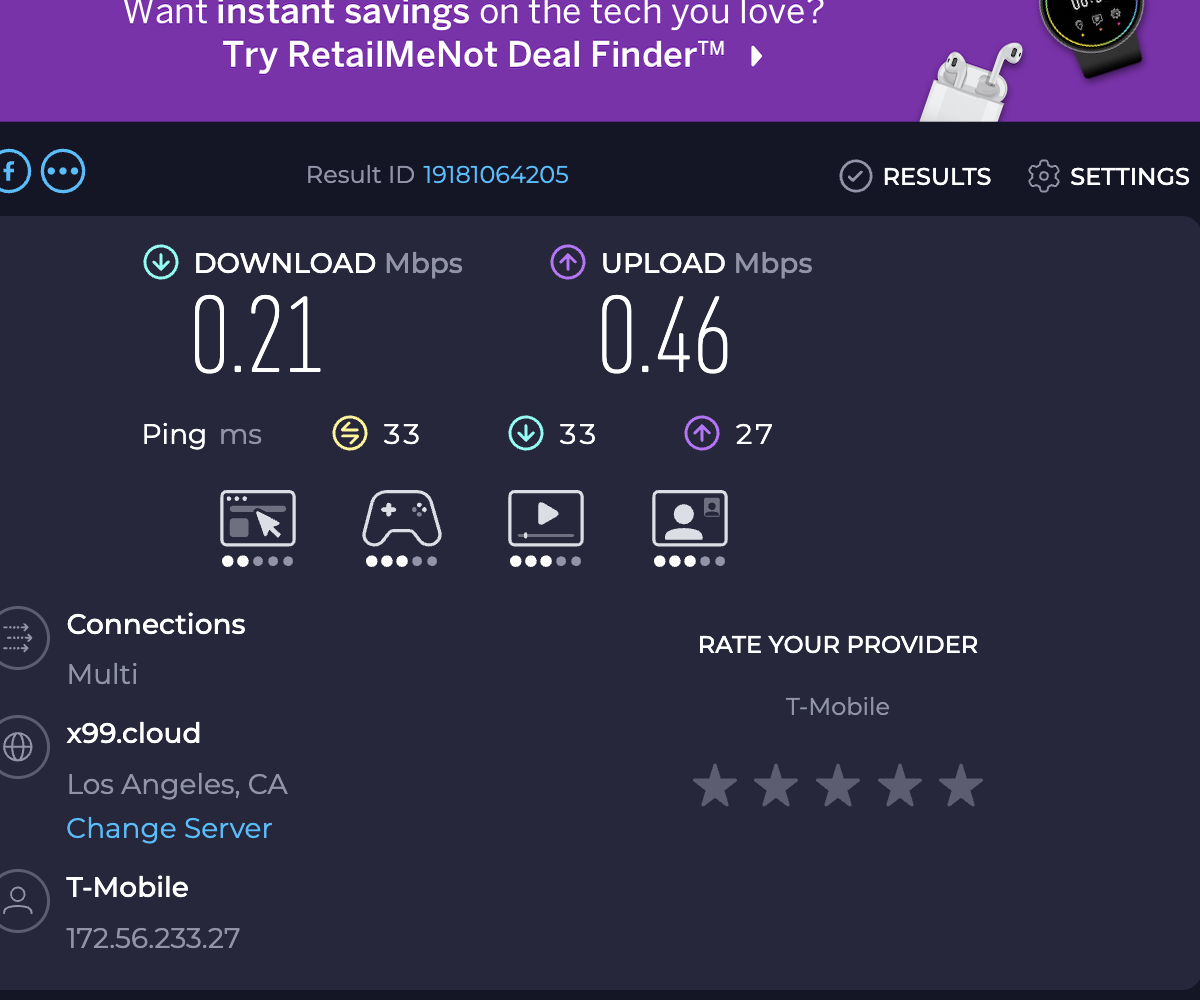
Same SIM, a minute apart.
0.21Mbps
306Mbps
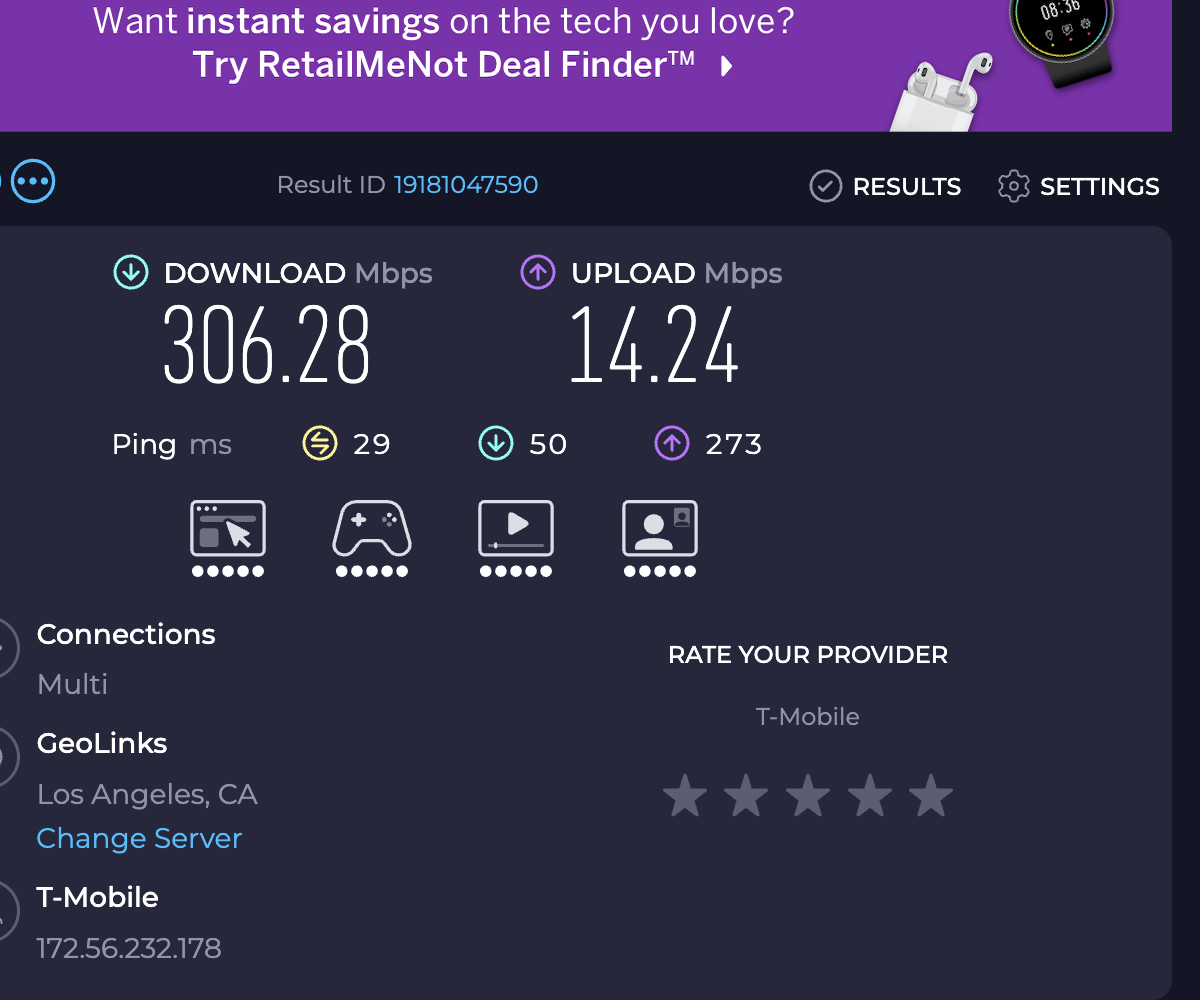
Real Speedtest results — same T-Mobile SIM, taken back-to-back. Your speeds depend on signal, plan, and device.
84 seconds
Watch the setup, start to finish.
Recorded on a Mac. On a Windows PC only the way the two devices link up is different: see the Windows steps.
Setup
Two apps. One connection.
On your iPhone right now? Install ProxyDeck, then open getfastnet.com on your computer for step 2. FastNet Connect installs on a Mac or a Windows PC, not on an iPhone.
-
Install ProxyDeck on your iPhone
The App Store name is ProxyDeck — Network Lab. It is free. Network Lab works independently; FastNet Connect uses its Mac Bridge mode, which is the one for Windows PCs too.
Install ProxyDeck — FreeiOS 16+. Network Lab also works without a computer.
-
Install FastNet Connect on your Mac or PC
It runs without a license for your first 2 hours of connected time, so you can check it on your carrier before paying. After that, a $29 one-time license keeps it running, and the same license works on both Mac and Windows. Already purchased? Click Activate on the page you got after buying, or paste your license key in the app.
Windows PC
Windows 10 or 11, x64 or ARM64. The Windows page has the installer and each step.
Download for WindowsNo card or email needed for the trial.
-
Connect
On a Mac: open ProxyDeck, select Mac Bridge, and tap Start Mac Bridge. Then connect from FastNet Connect over USB or nearby peer-to-peer Wi-Fi. Personal Hotspot stays off.
On a Windows PC: join the iPhone's Wi-Fi network (its Personal Hotspot) from the PC, click Connect in FastNet Connect, and scan the code it shows from ProxyDeck's Mac Bridge tab. Windows steps in detail.
Either way, keep ProxyDeck in the foreground while you are connected.
Why FastNet
Unlimited & full speed
Uses your phone's data, not hotspot allowance. No throttling, no data caps.
Private & secure
All traffic stays local between your devices. No cloud servers, no accounts, no data collection.
One click
No terminal commands, no config files. Click Connect once and all of your computer's traffic is routed automatically, on a Mac or a Windows PC.
Pay once
One-time purchase that covers Mac and Windows. No subscription. Stop paying $10-25/month extra for hotspot data you already have.
Pricing
One price. No subscription.
- FastNet Connect for Mac and for Windows
- One license covers both
- Free ProxyDeck iPhone app from the App Store
- One-click connect — routes all traffic
- Works with any carrier, not only US ones
- No jailbreak required
- Lifetime updates
- Email support
FastNet Connect · Mac + Windows
$29
one-time payment · lifetime updates · 30-day refund
Goes up to $39 on January 1, 2027.
Not sure yet? Try it free for 2 hours of connected time first.
Instant download after checkout · license key delivered on the spot.
Mac: macOS 13+ on Apple Silicon · PC: Windows 10 or 11 · iPhone: iOS 16+. Already have a license? Go to the downloads and setup.
Mac or Windows
Same result, two ways to link up.
On both, every app on the computer goes out through the iPhone, and the same license and the same free trial apply. What differs is how the computer reaches the phone.
| Mac | Windows PC | |
|---|---|---|
| Link to the iPhone | USB cable, or a direct peer-to-peer Wi-Fi link. Personal Hotspot stays off. | The PC joins the iPhone's Wi-Fi network, which away from home is its Personal Hotspot. No cable. |
| Pairing | None. The two apps find each other. | Scan a code with the iPhone once. It is remembered after that. |
| Runs on | Apple Silicon Macs, macOS 13 or later. | Windows 10 or 11, x64 or ARM64. |
| Get it | Download for Mac | Download and setup for Windows |
FAQ
Why does the App Store say ProxyDeck instead of FastNet?
They are two apps that work together: ProxyDeck — Network Lab is the free iPhone app, and FastNet Connect is the $29 app for your Mac or Windows PC. ProxyDeck also includes standalone network diagnostics that need no computer or purchase. Its Mac Bridge mode, which serves Windows PCs as well, connects to FastNet Connect only while ProxyDeck remains in the foreground.
How does this work?
Carriers track hotspot usage separately from phone data. FastNet Connect hands your computer's traffic to ProxyDeck on the iPhone, and ProxyDeck opens the connections itself, the way any app on the phone does. To the carrier, it looks like regular phone data, so it uses your unlimited phone data instead of your limited hotspot allowance. A Mac reaches the phone over USB or nearby peer-to-peer Wi-Fi; a Windows PC reaches it over the iPhone's Wi-Fi network.
How is this different from PDANet+?
PDANet+ pioneered this approach years ago and still works for some users. The differences: FastNet Connect is a native app for current macOS and for Windows 10 and 11, ProxyDeck is built for modern iOS, and the setup requires no terminal or manual proxy configuration. If PDANet+ already works for you, no need to switch. Where PdaNet+ stands on iPhone today.
Is FastNet a PairVPN alternative?
Yes, for the specific job of getting a Mac or a Windows PC online through a nearby iPhone. PairVPN's iOS app was removed from the App Store in October 2026 and its Android build has not been updated since 2023. FastNet Connect pairs with ProxyDeck, with a $29 one-time license and a foreground-only iPhone app. It does not replace PairVPN's remote home-network access or its Android client. What happened to PairVPN, and what changes on a Mac, and the same for a Windows PC.
Why pay $29 if I can do this with iproxy + a SOCKS5 server?
You can. iproxy 1082 1082 plus a SOCKS5 server on iPhone is the same idea, free, and well-documented. FastNet is for people who want it to just work without terminal commands, manual port forwarding, or remembering to set the system proxy each time. If you're comfortable in terminal and only need it occasionally, the manual setup is fine.
Will this be detected by my carrier?
Tethering detection usually relies on TTL inspection, User-Agent fingerprinting, and DNS heuristics. Because ProxyDeck's Mac Bridge uses the phone's TCP stack, traffic originates from the same network stack as other iPhone apps. No tool guarantees invisibility, and carriers may still infer usage from traffic patterns.
What speeds can I expect?
Usually whatever your cellular signal delivers. On a Mac over USB, Lightning-port iPhones cap around 280–320 Mbps because Lightning is USB 2.0, and USB-C iPhones (15 Pro and later) can push gigabit if the signal supports it. Over Wi-Fi, which is how a Windows PC connects, the wireless link between the two devices also plays a part. Real-world speeds depend on tower congestion and signal strength.
Is this legal?
FastNet is a standard SOCKS5 proxy — the same technology used by millions of developers daily. How you use your cellular data is between you and your carrier. We recommend reviewing your carrier's terms of service.
On a Mac: USB or Wi-Fi?
Either works. USB is a direct cable link between your Mac and iPhone: most reliable, lowest latency, and the phone charges while connected. Wi-Fi is a direct device-to-device link (like AirDrop) — no cable, and you don't need to be on any network, just have Wi-Fi on. Either way your Mac's traffic leaves the phone as ordinary phone data, not tethered hotspot data.
How does a Windows PC connect?
Over Wi-Fi. The PC joins the iPhone's Wi-Fi network, which away from home is its Personal Hotspot network, and pairs with ProxyDeck by scanning a code once. That network is only the local link between the two devices: the PC's internet traffic is handed to ProxyDeck, which sends it out as the phone's own. Download and setup for Windows.
Does it work with my carrier, and outside the US?
FastNet does not depend on a particular carrier or country. Your computer's traffic leaves the iPhone as ordinary phone data on whatever SIM is in it, which covers T-Mobile, Verizon, AT&T, Mint Mobile, Visible, and Cricket in the US as well as carriers elsewhere. It helps when your plan gives the hotspot less data or speed than the phone itself. If it does not work on your carrier, the 30-day refund applies.
Which computers and phones are supported?
Apple Silicon Macs on macOS 13 or later, and PCs on Windows 10 or 11, both x64 and ARM64. One license covers both. The phone has to be an iPhone on iOS 16 or later. Intel Macs, Linux, Chromebooks and Android phones are not supported.
Do I need to jailbreak my iPhone?
No. FastNet works on stock iOS 16+, no jailbreak needed.
Is my data safe?
Yes. Everything runs locally on your devices. FastNet has no servers, collects no data, and requires no account. Your traffic goes directly from your computer to your iPhone to the carrier — we never see it.
Is there a free trial?
Yes. FastNet Connect runs without a license for your first 2 hours of connected time, with no card or email. Only time your computer is actually online through your iPhone counts. The app tells you 10 minutes before the trial runs out; after that it needs the $29 one-time license. ProxyDeck on the iPhone is free either way.
What if it doesn't work for me?
Try it before you pay: the free trial is there so you can check your carrier and setup first. If you buy and it still doesn't work out, there is a 30-day money-back guarantee, no questions asked. Email us at pjiang726@gmail.com.